

Timeline Screenshot in DaVinci Resolve iPad (Alternative)
In diesem Artikel zeige ich dir einen alternative Weg, wie du ein Standbild (Screenshot) aus deiner Timeline in DaVinci Resolve für das iPad erzeugen kannst. Und ich spreche nicht von einem iOS-Screenshot. Ich spreche von einem qualitativ hochwertigen Bild direkt aus deiner Timeline. Wenn du den aktuellen einfachen Weg wissen willst, dann ließ diesen Artikel hier: Screenshot von Timeline in DaVinci Resolve iPad

[Video] Screenshot von der Timeline: DaVinci Resolve iPad
Schritt 1: Geh zur Fusion Page
Um einen Screenshot zu erhalten, benötigst du die Fusion Page. Wenn du nicht weißt, wie du alle anderen Pages erhalten kannst, les zuerst den folgenden Artikel.
Lese diesen Artikel zuerst: Alle Funktionen in DaVinci Resolve fürs iPad freischalten? (So geht’s)
Schritt 2: Rechtsklick in das Viewer Fenster
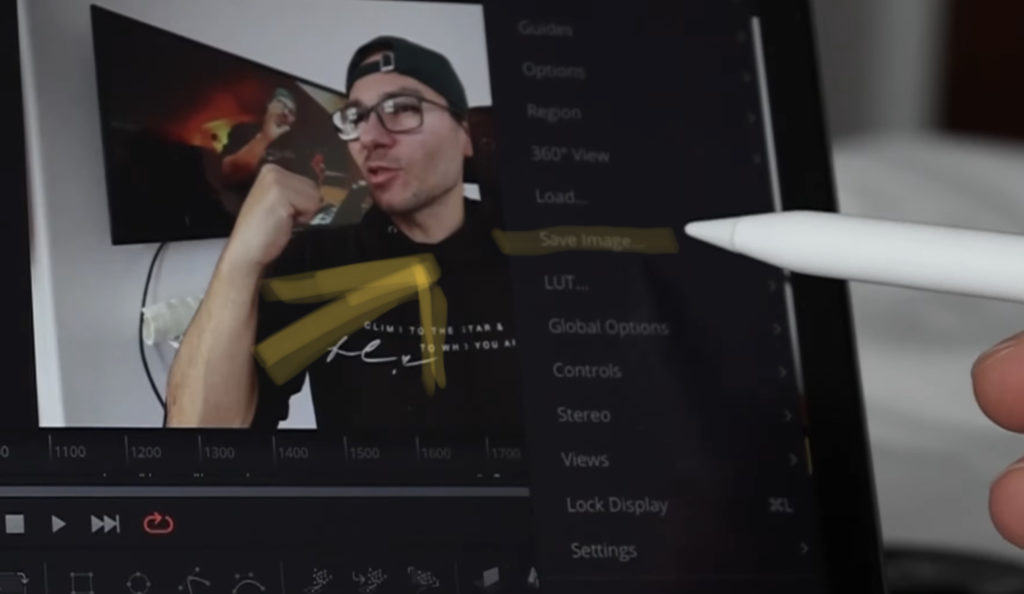
Klicke länger gedrückt (oder Rechtsklick mit der Maus) auf der Fusion Page in den Viewer Fenster. Vergewissere dich, dass sich der Abspielkopf (Playhead) an der Stelle in der Timeline befindet, an der du einen Screenshot machen willst. Klicke nun auf Save Image…
Schritt 3: Ändern den Pfad zu Capture
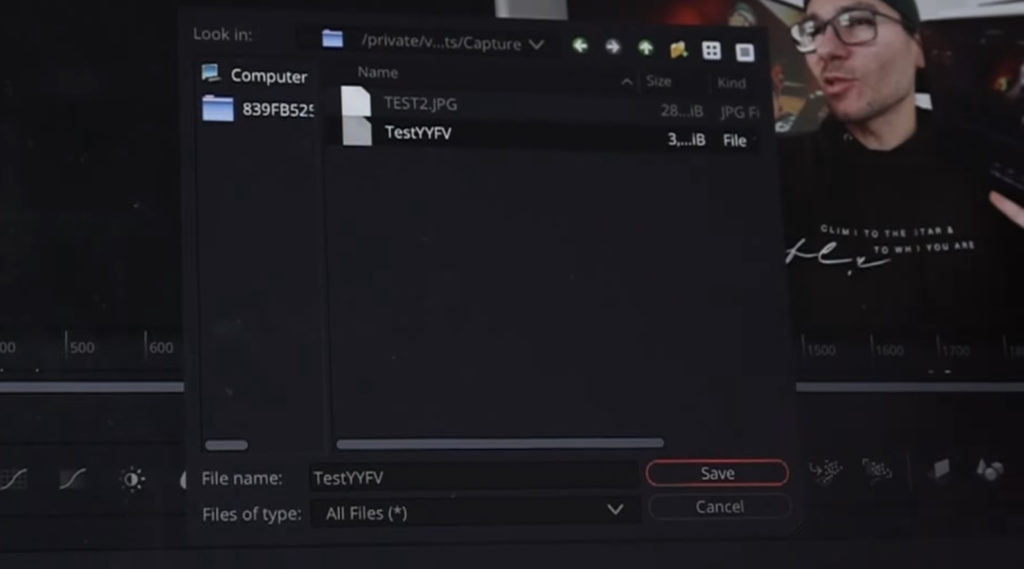
Auf meinem iPad konnte ich einfach auf den Ordner mit dem Zahlennamen auf der linken Seite klicken. Dann navigiere zu: \Documents\Capture
Schritt 4: Dateityp in JPEG ändern
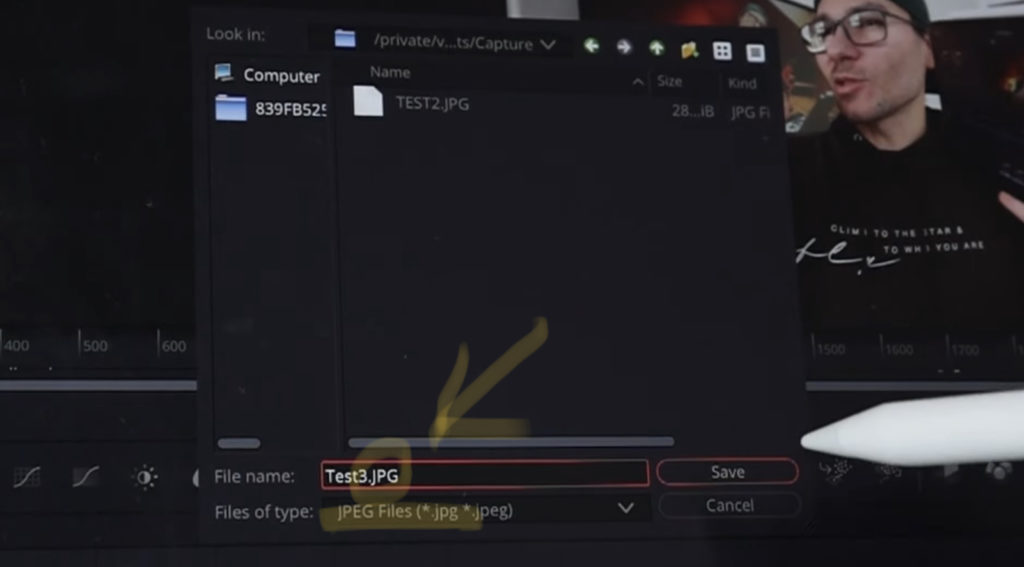
Um eine korrekte Datei auf dem iPad zu erstellen, musst du den Dateityp auf JPEG-Files ändern. Außerdem musst du die Endung *.JPG manuell eintippen.
Wichtig: Du musst auch die Dateiendung in den Dateinamen eingeben. Zum Beispiel: Test3.jpg
Sschritt 5: Zum Öffnen des Bilds öffne die Files App
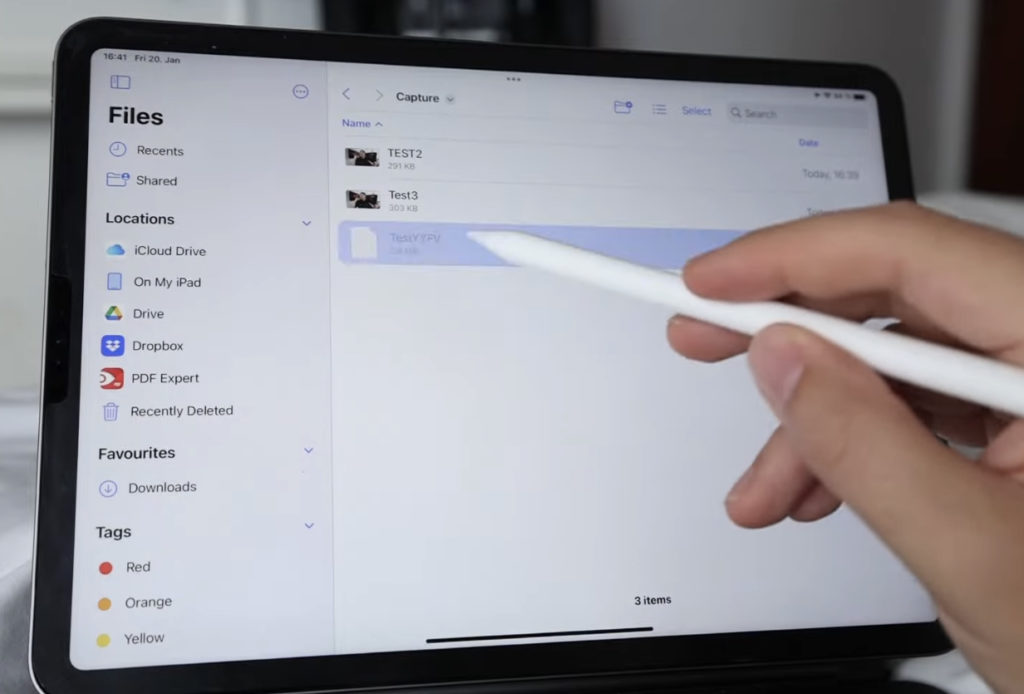
Öffnen die App „Files“ auf deinem iPad und navigieren zum Ordner „DaVinci Resolve“. Innerhalb des DaVinci Resolve-Ordners siehst du auch den Ordner “Capture”. Wenn du, wie im Screenshot zu sehen, vergessen hast, die Endung .jpg zu schreiben, kann dein Screenshot nicht angezeigt werden. Wenn du die Endung korrekt eingegeben hast, ist der Screenshot sichtbar.


Videos auf dem iPad schneiden – das kann einfacher sein, als du denkst.
Ich bin Daniel – Filmemacher, Kursleiter und digitaler Nomade. Ich habe Final Cut Pro und DaVinci Resolve auf dem iPad intensiv in echten Projekten getestet – und zeige dir Schritt für Schritt, wie du das auch kannst. Ohne Technik-Frust. Ohne komplizierte Fachbegriffe.
Meine DaVinci Resolve iPad MasterClass und Final Cut Pro iPad MasterClass haben schon hunderten Anfängern geholfen – auch denen, die vorher noch nie geschnitten haben.
AI Blemish Removal in DaVinci Resolve für iPad (Komplettes Tutorial)
9. September 2026 @ 7:57
[…] du iPhone HDR Videos bearbeitest in DaVinci Resolve iPad• Screenshot von der Timeline (DaVinci Resolve iPad)• Der Vergleich: DaVinci Resolve iPad Studio oder kostenlos?• So synchronisierst du […]
Phoenix Flow UPDATE: Alle Neuen Funktionen erklärt!
1. Oktober 2026 @ 8:30
[…] du iPhone HDR Videos bearbeitest in DaVinci Resolve iPad• Screenshot von der Timeline (DaVinci Resolve iPad)• Der Vergleich: DaVinci Resolve iPad Studio oder kostenlos?• So synchronisierst du […]
Ich entwickle etwas Neues für Smartphone-Filmmaker
1. Oktober 2026 @ 8:31
[…] du iPhone HDR Videos bearbeitest in DaVinci Resolve iPad• Screenshot von der Timeline (DaVinci Resolve iPad)• Der Vergleich: DaVinci Resolve iPad Studio oder kostenlos?• So synchronisierst du […]
DaVinci Resolve iPad: SCHON WIEDER EIN UPDATE ???
4. Oktober 2026 @ 8:26
[…] du iPhone HDR Videos bearbeitest in DaVinci Resolve iPad• Screenshot von der Timeline (DaVinci Resolve iPad)• Der Vergleich: DaVinci Resolve iPad Studio oder kostenlos?• So synchronisierst du […]
Profi Speed Ramps auf dem iPad (Bezier Retime Curves erklärt)
22. Oktober 2026 @ 7:32
[…] du iPhone HDR Videos bearbeitest in DaVinci Resolve iPad• Screenshot von der Timeline (DaVinci Resolve iPad)• Der Vergleich: DaVinci Resolve iPad Studio oder kostenlos?• So synchronisierst du […]
DaVinci Resolve iPad UPDATE: Was - 20% Rabatt ???
5. November 2026 @ 16:01
[…] du iPhone HDR Videos bearbeitest in DaVinci Resolve iPad• Screenshot von der Timeline (DaVinci Resolve iPad)• Der Vergleich: DaVinci Resolve iPad Studio oder kostenlos?• So synchronisierst du […]